Business Analytics · Sports Data 🔬 Analyst + 🏗 Architect ◆ Independent 🪟 Simulated Data
WEHF —
Full-Funnel Sports Analytics
Case Study
A comprehensive mock analytics ecosystem built from scratch for a fictional professional women's hockey league — SQL warehouse, 7-page Power BI dashboard, DAX modeling, and six complete analyses spanning ticketing, fan segmentation, email performance, web behavior, merchandise, and market expansion.
🪟 Mock Case Study · Simulated Data
The Women's Elite Hockey Federation (WEHF) is a fictional league created entirely for this portfolio project. All data was simulated with realistic fan behavior, geographic distribution, and market variability to mirror what you'd encounter in a real startup sports property. This project demonstrates how I would approach building an analytics infrastructure and insight layer for a new sports organization — not a client engagement.
SQLPower BIDAXFan SegmentationTicket FunnelEmail AnalyticsWeb BehaviorMarket ExpansionLTV Modeling
The Problem

Building analytics for a league
that doesn't exist yet.

A startup professional sports league faces an analytics challenge that's different from an established property. There's no historical baseline, no inherited infrastructure, and no analytics team to hand off to. Everything has to be built from raw data with no prior context.

The questions a startup league actually asks are harder than they look: Where are our fans? Which markets are worth activating? Are we saturating our email list before we've earned the engagement? Which ticket buyers will come back, and which were one-game curiosity?

This project was built to answer all of those questions simultaneously — not as a series of disconnected reports, but as a unified analytics ecosystem where every insight layer feeds the next one. Fan segmentation informs email strategy. Email performance informs digital investment. Digital behavior informs market expansion priorities.

The goal wasn't to build dashboards. It was to demonstrate how I think when standing up analytics for a new organization — what to build first, what questions matter most, and how to connect technical outputs to business decisions.

Gap 01 · No Analytics Foundation
A startup league has no warehouse, no reporting layer, and no shared definitions. The first job is building the infrastructure that makes any analysis possible — before asking a single business question.
Gap 02 · Disconnected Data Sources
Ticketing, email, web, and merchandise data don't naturally connect. Without relational modeling, every analysis requires manual reconciliation — making real-time decision support impossible.
Gap 03 · Undifferentiated Fan View
Treating all fans the same wastes budget and misses intent. The highest-value insight from a startup league is identifying which fan segments are worth investing in before resources are allocated.
Gap 04 · No Expansion Intelligence
Knowing where to grow is harder than knowing current performance. Using digital signals and early fan behavior to identify low-cost market expansion opportunities is the kind of forward-looking work that shapes league strategy.
My Role

Analyst, architect,
and product owner.

🏗
What I Built
  • Designed and built the SQL data warehouse — relational tables for fans, ticketing, email campaigns, web traffic, and merchandise with realistic geographic distribution across simulated league markets
  • Built a 7-page Power BI dashboard suite — Executive Summary, Ticketing Funnel, Fan Segmentation, Email Performance, Web Behavior, Merchandise, and Market Expansion
  • Created all DAX measures — lifetime value metrics, renewal rate analysis, email campaign scoring, and web session flow logic using custom measures built from scratch
  • Simulated realistic fan data — behavioral distributions, purchase patterns, geographic concentration, and data imperfections that mirror real startup league environments
  • Derived all six analytical insights — ticket funnel drop-offs, email saturation flags, web bounce patterns, fan cohorts, merchandise underperformance, and market expansion signals
🔬
How I Approached It
  • Treated it like a real engagement — designed the warehouse around the business questions first, then built the data structures to support them rather than building data and asking questions later
  • Leaned into realistic imperfection — the simulated data includes the kinds of gaps, inconsistencies, and market variability you actually encounter in a startup sports org, not clean classroom data
  • Each insight connects to a decision — every analysis was framed around what a department head (marketing, sales, digital, ops) would actually do differently based on the finding
  • Cross-department coverage — intentionally designed to cover every major business function so the dashboard suite could serve as a complete analytics operating layer for a new organization
  • Built for executive readability — the Executive Summary page is designed to answer the five questions a league GM asks on Monday morning without requiring any analytical background
The Approach

Infrastructure first,
then insight

Five stages — building the foundation before the analysis, then connecting every insight to a business decision.

01
Schema Design
Designed a relational SQL schema covering fans, ticketing, email, web, and merch — built around the business questions, not the other way around.
02
Data Simulation
Generated realistic fan behavior with geographic distribution, purchase patterns, and intentional data imperfections that mirror a real startup environment.
03
DAX Modeling
Built LTV metrics, renewal rates, email scoring, and session flow logic using custom DAX measures designed to support cross-page drill-through.
04
Dashboard Build
Designed 7 Power BI pages — each answering one analytical question and connecting to the others through shared filters and consistent KPI definitions.
05
Insights Layer
Translated every dashboard view into a decision recommendation — framed for the marketing, sales, digital, and ops stakeholders who would act on it.
The Stack

Tools & data model

Four tools and a relational schema diagram showing how the five source tables connect into the analytics layer.

SQL
SQL
Relational data warehouse — 5 source tables, geographic distribution, realistic dirty data
Power BI
Power BI
7-page dashboard suite — executive to department-level views
📑
DAX
LTV metrics, renewal rates, email scoring, session flow logic — all custom measures
📈
Excel
Data validation, QA reference tables, market mapping inputs
WEHF Data Warehouse Schema
SQL · 5 Relational Tables · Fan-Keyed Architecture
Mock Dataset
fans 🔑 fan_id name, email, city, state acquisition_channel signup_date, segment ltv_tier, renewal_flag CORE ANCHOR TABLE ticketing 🔑 ticket_id 🔗 fan_id game_id, section, price purchase_date, channel funnel_stage, converted TRANSACTION FACTS email_campaigns 🔑 send_id 🔗 fan_id campaign_name, send_date opened, clicked, converted send_frequency, score CAMPAIGN EVENTS web_sessions 🔑 session_id 🔗 fan_id (nullable) entry_page, exit_page pages_viewed, duration device, bounced SESSION BEHAVIOR merchandise 🔑 order_id 🔗 fan_id product, team, category revenue, order_date market, channel MERCH TRANSACTIONS 🔑 Primary Key 🔗 Foreign Key (fan_id) —— Direct FK join - - Optional / nullable join Simulated data · realistic geographic distribution
The Analysis

Six questions.
Six decisions.

Every analysis was built around a specific business question — and framed around the decision it would drive, not just the finding it would surface.

🎫
Ticket Sales Funnel
Where does the drop-off happen?
Identified conversion drop-offs between ticket browsing and checkout. Modeled differences by weekday vs. weekend, game quality tier, and fan type — surfacing where targeted friction reduction would move the most volume.
📧
Email Performance
Are we emailing too much?
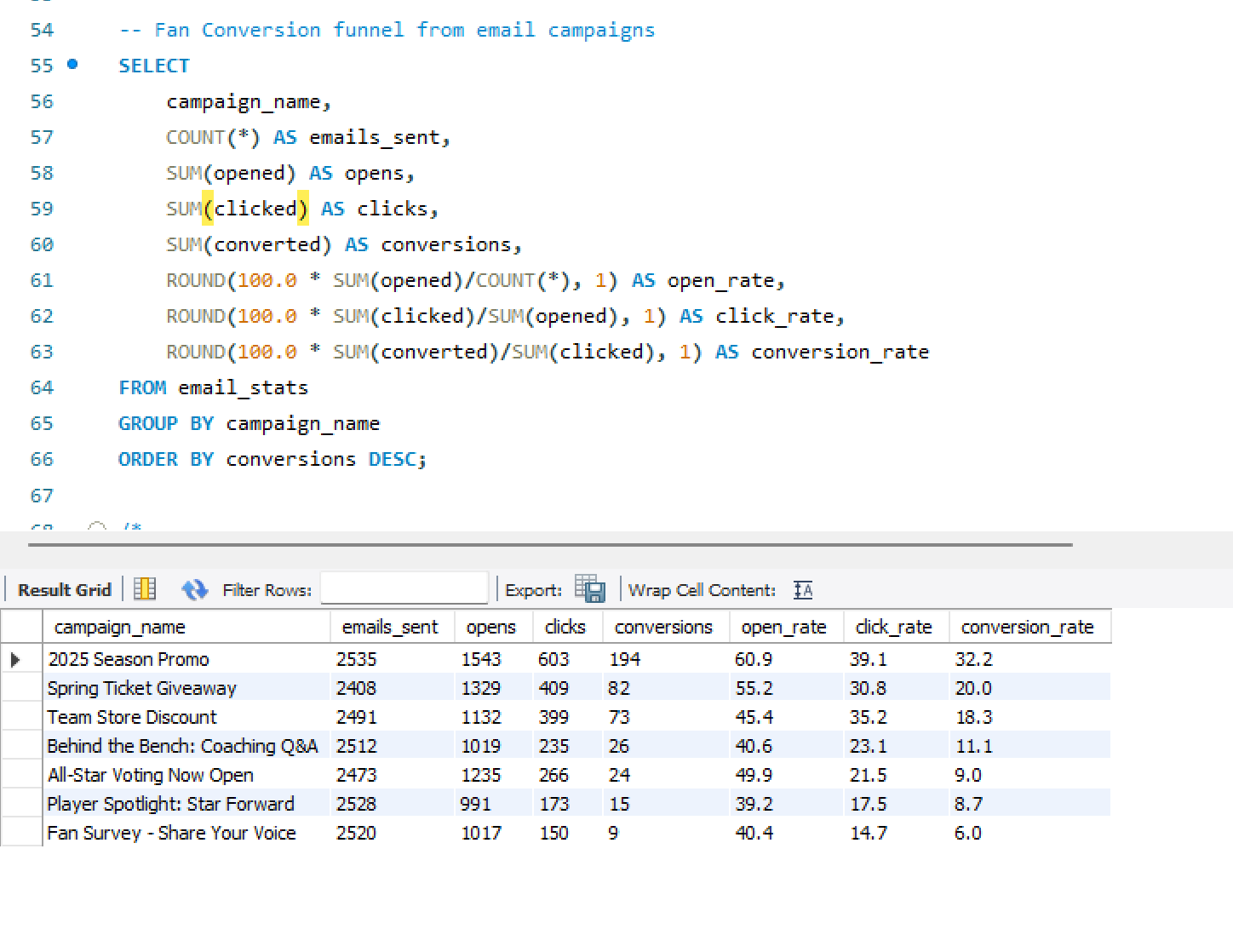
Analyzed open/click behavior, conversion rates, and send-frequency impacts. Flagged oversaturation issues where high-frequency sends were actively reducing conversion, and identified underperforming creative segments.
🌐
Web Behavior (Sankey)
Where does traffic go after it lands?
Mapped session flows across the site, flagged high-bounce pages and dead-end paths, and recommended specific mobile UX improvements based on device-segmented drop-off patterns.
👥
Fan Segmentation
Who are the fans worth investing in?
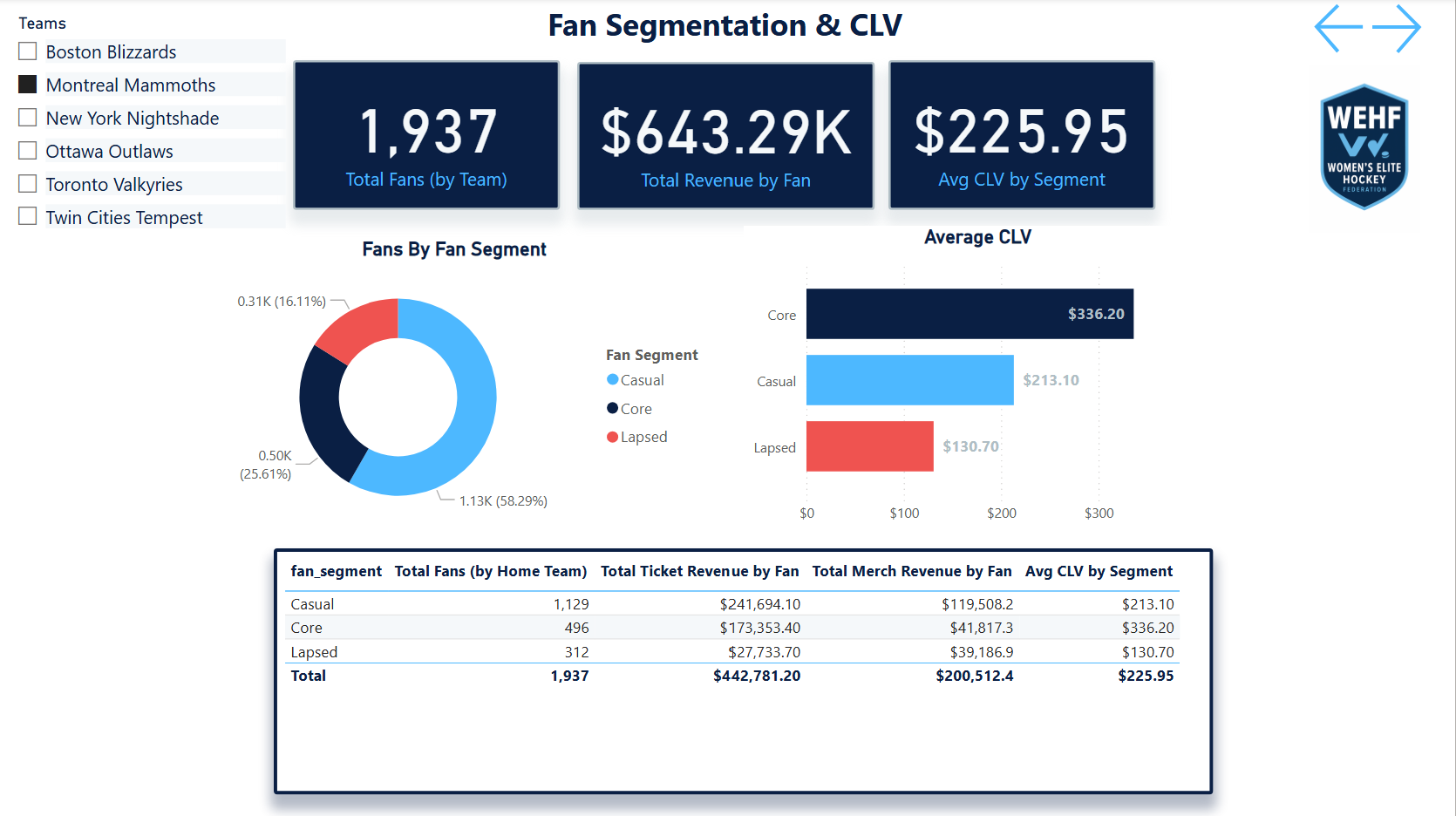
Built fan cohorts by market, engagement level, and purchase behavior. Identified key markets with strong digital signals and low activation costs — the most actionable output for a startup league with limited budget.
📸
Merchandise & Revenue
Why is merch underperforming in some markets?
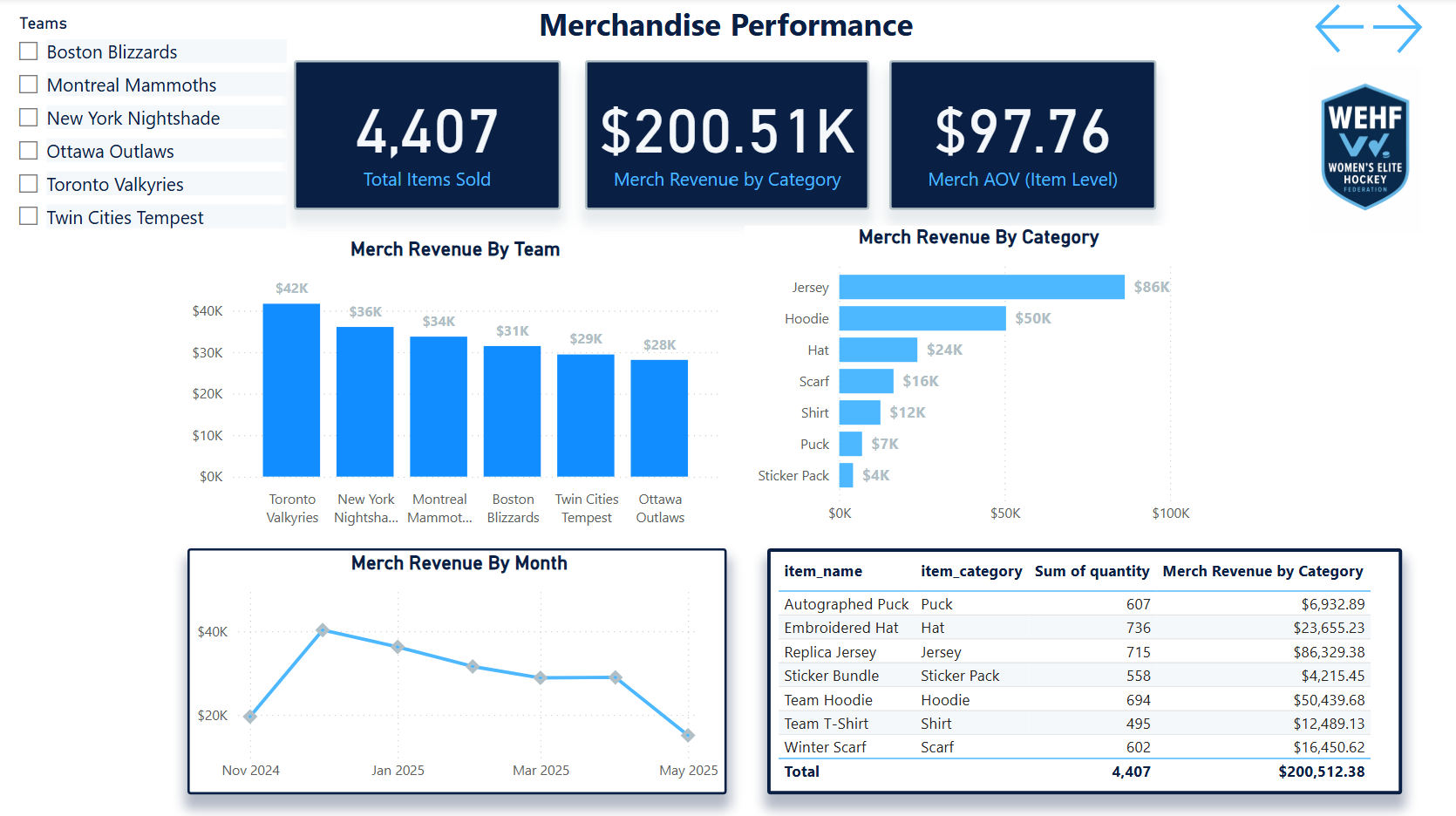
Revealed merchandise underperformance outside core teams and flag markets. Suggested localized and performance-themed product ideas based on fan behavior and team affinity patterns in secondary markets.
📍
Market Expansion
Where should the league go next?
Used early fan digital signals in non-core cities to identify low-cost testing opportunities for league growth. Framed as a prioritized market scorecard, not just a map.
The Output

Seven pages.
One analytics layer.

Each dashboard page answers one analytical question and connects to the others through shared filters and consistent KPI definitions. Click any screenshot to expand.
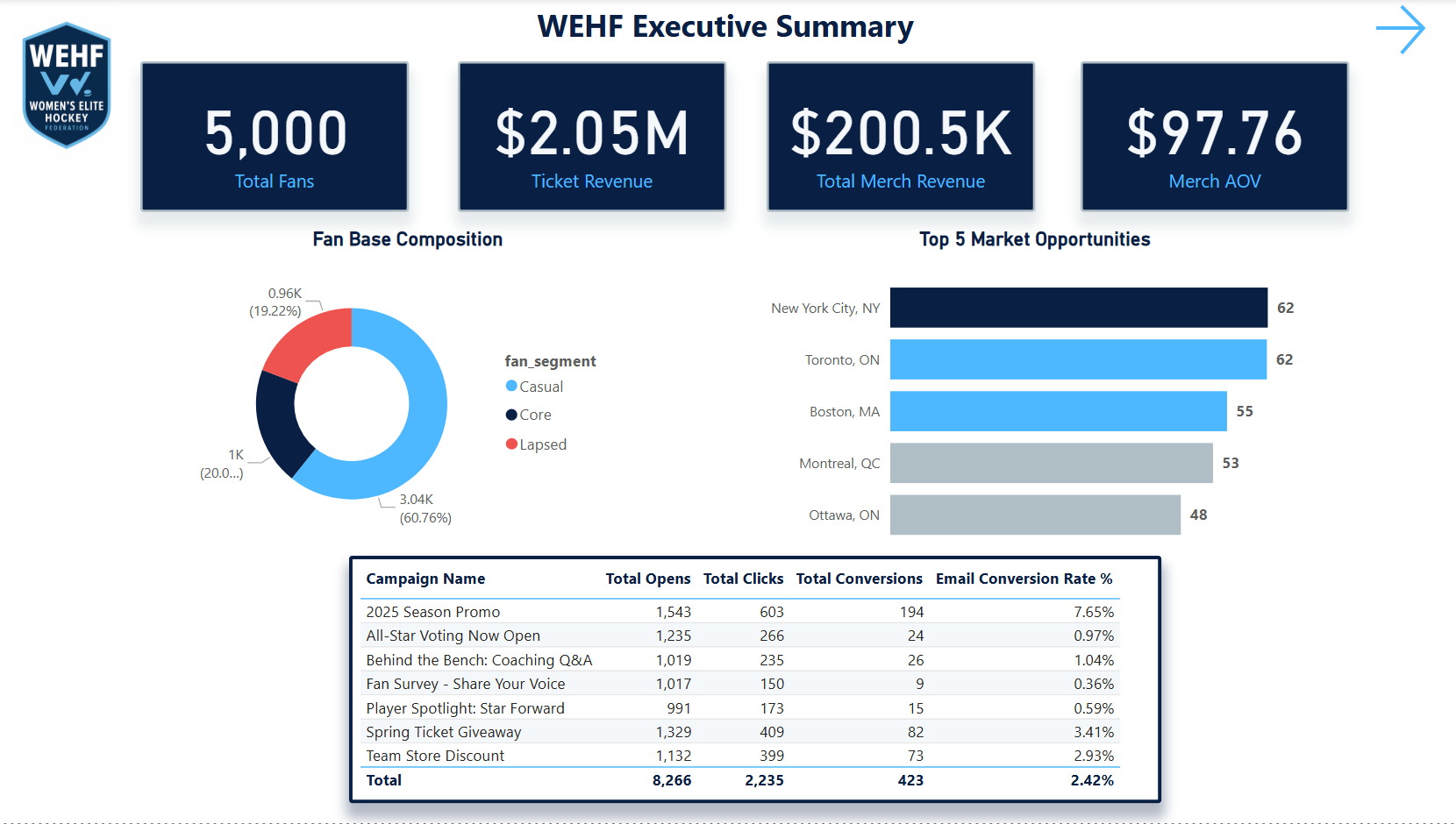
Executive Summary Dashboard
Page 1 — Executive Summary: The Monday morning view. Top-line KPIs, league health at a glance, and quick navigation to any department-level analysis. Designed for the GM who has 60 seconds before the weekly call.
Page 1 of 7Power BIMock Data
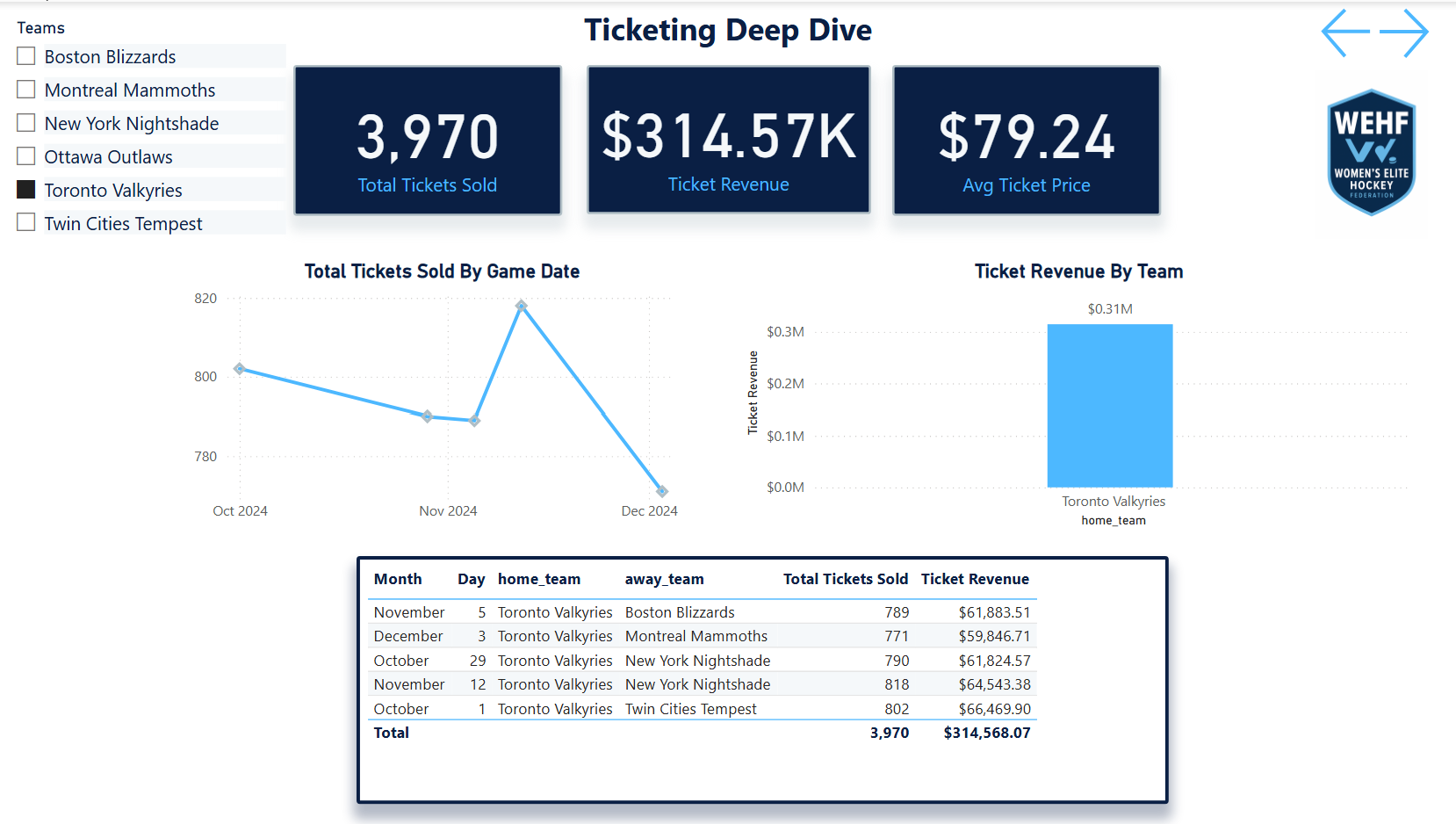
Ticketing Funnel Dashboard
Ticketing Funnel
Page 2 · Browse-to-purchase conversion · weekday vs weekend
Fan Segmentation Dashboard
Fan Segmentation
Page 3 · Market cohorts · engagement level · LTV tiers
Email Campaign Performance
Email Performance
Page 4 · Open/click rates · saturation flags · conversion scoring
Merchandise & Revenue Dashboard
Merchandise & Revenue
Page 5 · Product performance · market-level underperformance
Web Behavior Sankey flow · Page 6
Web Behavior Sankey
Page 6 · Session flows · bounce flags · mobile UX gaps
Market Expansion Growth signals · Page 7
Market Expansion
Page 7 · Digital signals · low-cost expansion scorecard
SQL & Data Layer
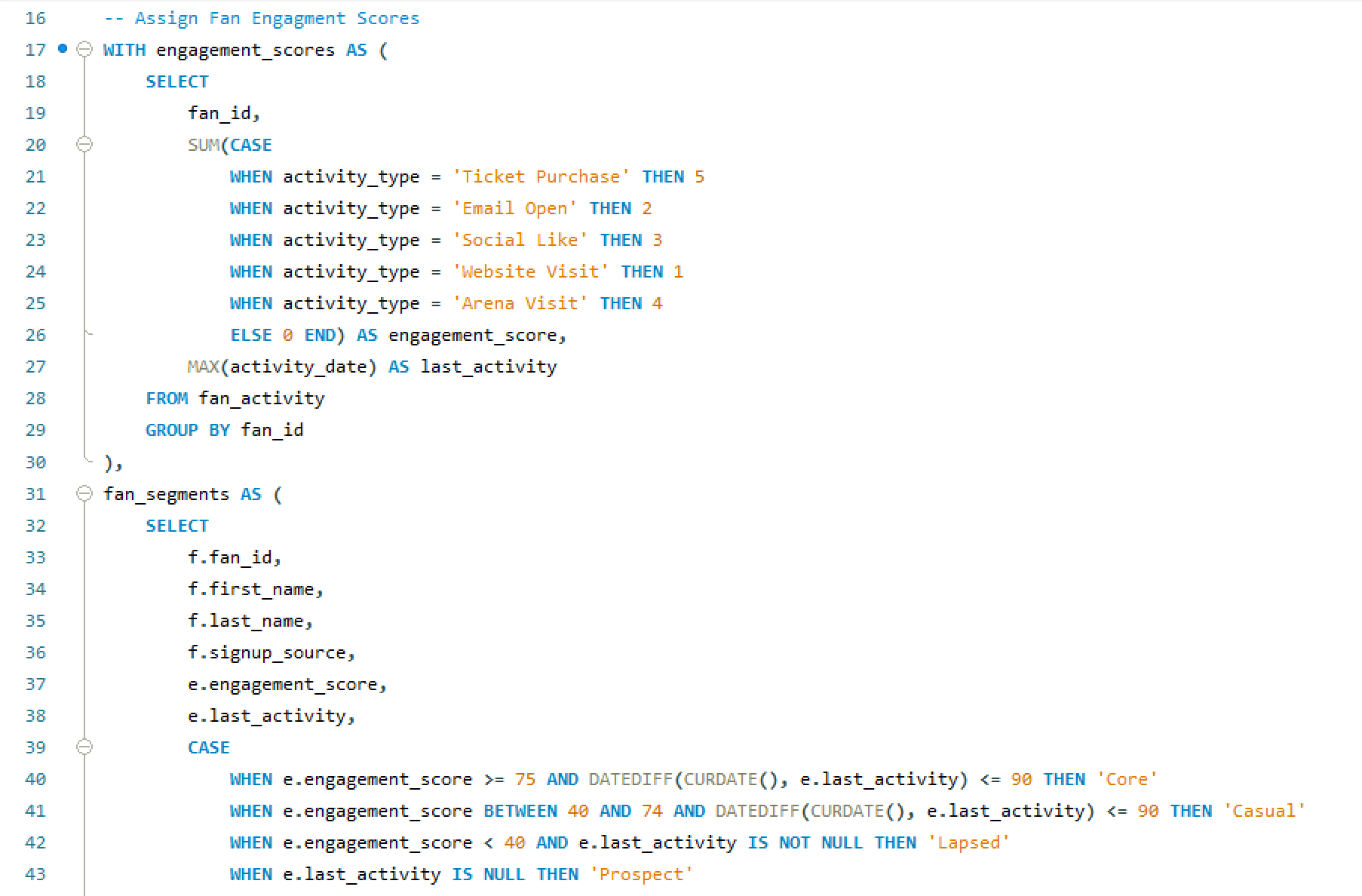
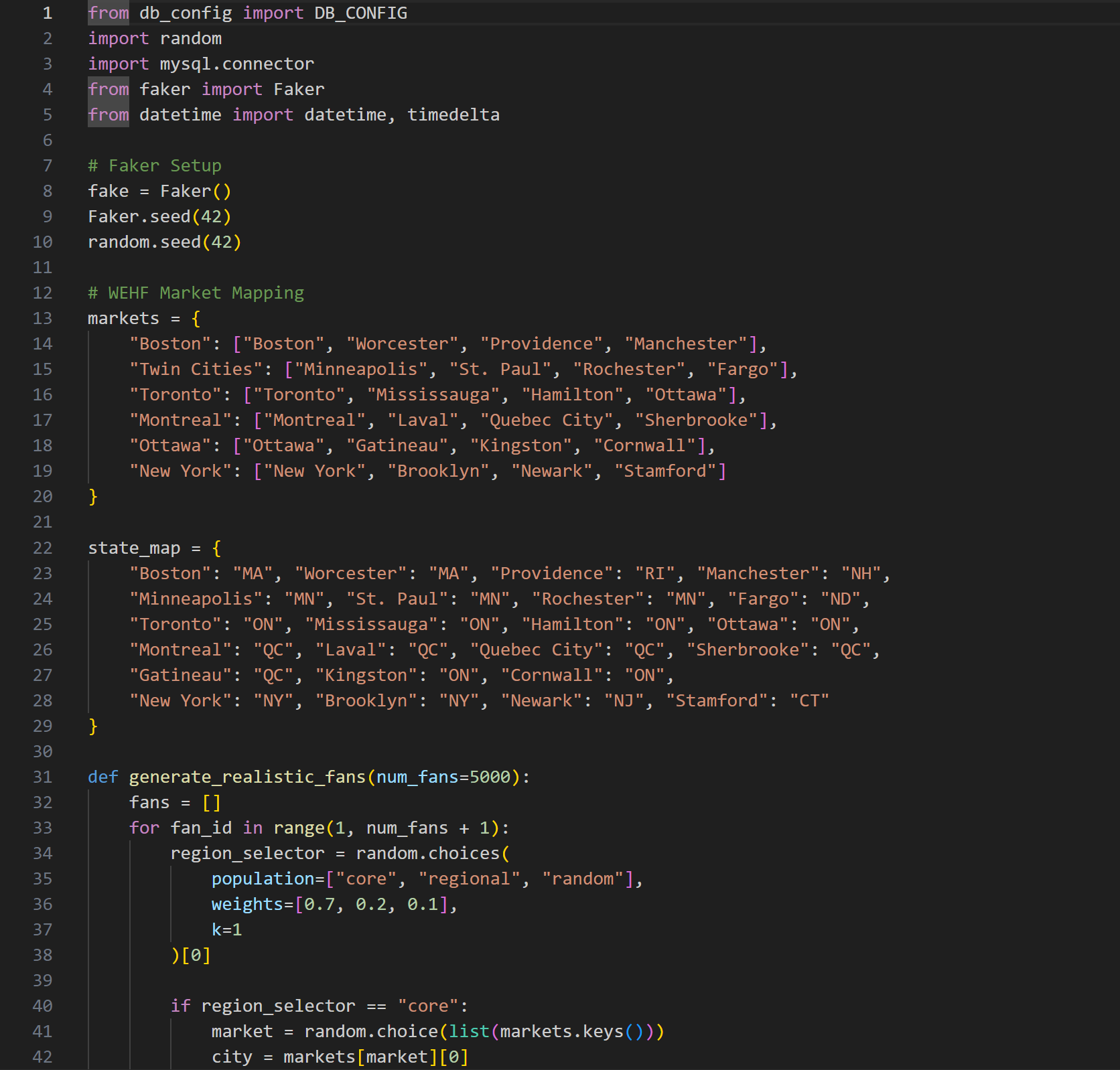
Fan Engagement SQL Script
Fan Engagement Script
SQL · fan scoring and engagement logic behind the segmentation model
Insert Fans SQL
Data Simulation
SQL · fan table population with geographic distribution and behavioral seeding
Scale

The stat sheet

7 pages
Power BI Dashboard
Executive Summary, Ticketing, Fan Segmentation, Email, Web, Merchandise, Market Expansion — one per business function.
5 tables
SQL Warehouse
Fans, ticketing, email campaigns, web sessions, merchandise — all fan-keyed and geographically distributed to simulate real league markets.
6 analyses
Full-Funnel Coverage
Ticket funnel, email saturation, web behavior, fan segmentation, merchandise, and market expansion — each connected to a decision.
4 depts
Stakeholder Coverage
Marketing, sales, digital, and ops — each dashboard page was designed for a specific department's decision-making workflow.
Analyst Lens

Key decisions & tradeoffs

The choices that shaped how this case study was built — and why each one mattered more than it might seem.

DecisionRationaleTradeoff
Fan-keyed relational schema Anchoring every table to a shared fan_id was the foundational decision that made every cross-source analysis possible. A ticket buyer who also opens emails and buys merchandise is one person — the warehouse had to know that. Without it, fan segmentation and LTV modeling would require manual joins on every analysis. Web sessions nullable — anonymous web traffic can't always be attributed to a known fan. Rather than forcing attribution, web_sessions carries a nullable fan_id, which kept the data honest at the cost of some cross-source completeness.
Realistic imperfect data The simulated dataset was intentionally built with gaps, inconsistencies, and market variability. Startup sports orgs don't have clean data. A portfolio project that assumes perfect data doesn't demonstrate how to operate in reality — it demonstrates how to operate in a classroom. More credible output — the analyses surface data quality observations alongside business insights, which is closer to what a real analytics engagement actually produces.
One page per business question A 7-page dashboard that answers seven distinct questions is more useful than a single dashboard that tries to answer all of them. Each page was scoped to one stakeholder and one decision — the marketing director doesn't need the ticketing funnel on the same screen as the merchandise breakdown. Cross-page navigation required — connecting insights across pages requires the user to move between views. For a more integrated experience, a unified cross-filter layer would be a v2 enhancement.
Decision framing over data presentation Every analysis concluded with a specific recommended action, not just a finding. The email saturation insight doesn't end at “send frequency is too high for this cohort” — it ends at “reduce cadence for engaged non-converters by 40% and reallocate send budget to lapsed purchasers.” That's the difference between an analytics report and analytics leadership. Demonstrates PM thinking — framing outputs as decisions rather than findings is the lens that separates an analyst who reports on data from one who drives business outcomes with it.
×